
Every service your business runs on, from Google Analytics to your Facebook Page, has a screen where you add a person by email and choose what they can do. That is the safe way to let an agency, a web designer or a new employee in: the account stays in your business's name, and you can take the access back in the same screen.
Sending a password does the opposite. The person signs in as you, sees everything, and keeps that access until you change the password.
Below are the steps for each service, how to check who owns your domain, and what to do when a past agency still holds one of your accounts. The steps come from each provider's help pages, opened on October 20, 2026.
Before you start: one company login
Each service was opened at some point with a login: yours, an employee's or a past vendor's. When that person leaves, the access can leave with them.
Pick one Google Account that belongs to the company and does not depend on one person, and make it the owner in every Google service below. Google Ads makes the same point: if an account has a single administrator and that person becomes unavailable, access can be lost, so it suggests adding at least one more administrator (Google Ads Help).
Do the same in Meta: the business portfolio should be created by the owner, or by the person who will stay in charge of it.
How to add a user to Google Analytics
You need the Administrator role to add people (Analytics Help).
- In Analytics, click Admin (the gear at the bottom left).
- In the Property column, click Access Management.
- Click +, then Add users.
- Type the person's email.
- Leave Notify new users by email checked if you want them to get an email.
- Choose a role and click Add.
Which role to give (Analytics Help):
| Role | What it can do |
|---|---|
| Administrator | Full control, including adding and removing users. Keep it for your company login. |
| Editor | Full control of the property's settings. Cannot manage users. |
| Marketer | Creates audiences, events and key events, on top of Analyst. |
| Analyst | Shares explorations with other users, on top of Viewer. |
| Viewer | Sees the data and the settings and changes what shows in its own reports. Cannot change settings. |
For someone who only needs to read your numbers, Viewer is enough.
How to add a user to Google Search Console
Only owners see the people screen (Search Console Help).
- Open your website's property.
- Click Settings, then Users and permissions.
- Click Add user, type the email and choose a permission.
| Permission | What it can do |
|---|---|
| Owner | Full control: adds and removes users, changes settings, uses every tool. |
| Full | Sees all the data and uses most tools, such as submitting a sitemap. Cannot add or remove people. |
| Restricted | Sees most reports, with few actions. |
An agency that works on your site usually needs Full. Owner stays with your company login.
How to add a manager to your Google Business Profile
- Go to business.google.com and open your profile.
- Open Business Profile settings, then People and access.
- Click Add, type the email and choose the access level.
- Click Invite.
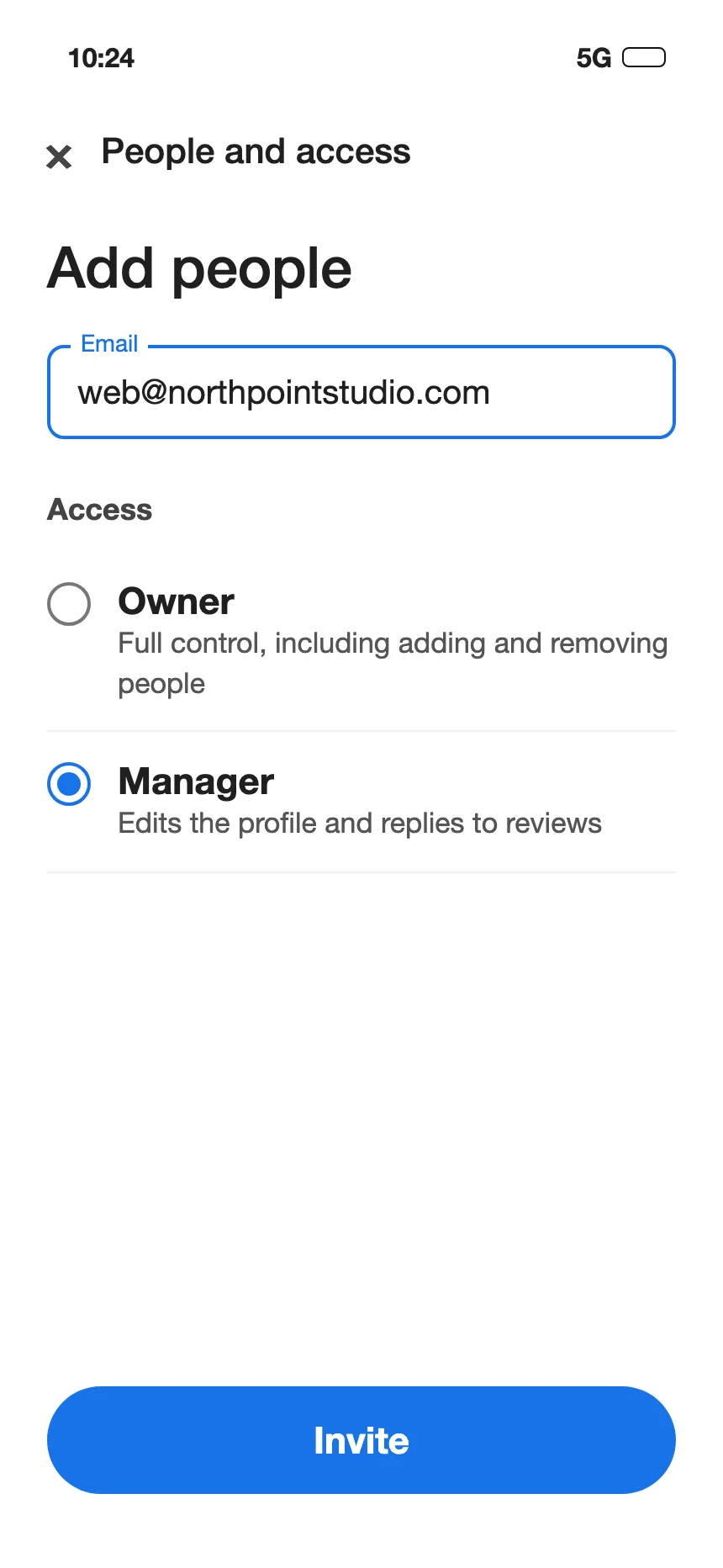
A profile can have several owners and one primary owner. An owner has full control, including adding or removing people and deleting the profile. A manager can edit the profile and reply to reviews, but cannot add or remove people or remove the profile. Give providers Manager.
If the primary owner today is an employee or a past vendor, move it to your company login: in People and access, choose the person, click Edit next to Access, select Primary owner and save. Only the primary owner can do this, and the new owner waits 7 days before managing every feature (source).
How to give an agency access to your Google Ads account
Here it works the other way around. You send the agency your customer ID, they send a link request from their manager account, and you accept it (Google Ads Help).
- Find your customer ID: click your profile picture at the top right; the number shows under your account name (source).
- Send it to the agency. Google advises sharing it only with people you trust, because anyone who has it can use it to reach your Google Ads information (source).
- When they send the request, go to Admin > Access and security > Managers, and in the Actions column click Accept.
Your ads keep being paid with your payment method. To end the link, go to the same Managers tab, click Remove access and then Unlink (source).
What is a Meta business portfolio?
A business portfolio is where your business keeps its Facebook Page, Instagram account, ad account and other assets, together with the people who can work on them (Meta Business Help Center). Some Meta pages still call it Business Manager.
Two rules matter more than any step:
- Each asset belongs to one portfolio. "Business assets can only belong to 1 business portfolio" (source). If an agency created the portfolio, your Page or ad account may be sitting in theirs.
- Claiming an existing ad account can move it into a portfolio for good, so it can no longer be transferred to another one (source).
To create your own: go to business.facebook.com, open the menu below Home, click Create a business portfolio, and type the business name, your name and a business email you read. One person can create up to 2 portfolios (source).
How to give an agency access to your Facebook Page and ad account
In Meta, the agency joins as a partner. Your assets stay in your portfolio, and the partner can't share them with anyone else; only the business that owns an asset can share it (Meta Business Help Center).
- Ask the agency for their business portfolio ID.
- In your portfolio, open Settings, and under Users click Partners. If you don't see it, your login doesn't have full control of the portfolio.
- Click Add, then Give a partner access to your assets.
- Type the agency's ID and click Next.
- Choose each asset and the access: full control, or partial access to specific tasks such as content, ads or messages.
- Click Assign assets.
Meta also asks you to turn on two-factor authentication for the portfolio if it isn't on yet.
For a Page, keep full control in your hands. A Page needs at least one person with full control to stay active; with nobody in full control, Meta deactivates it and schedules it for deletion (source). Most agencies can do their work with partial access.
Who owns my domain?
The domain is your address online, and your website and email depend on it.
- Go to lookup.icann.org, type your domain, and look at the Registrar field. That is the company where it is registered (ICANN).
- Sign in to that company with a login of your business. If you can't, the domain is in someone else's account.
Paying for a domain is different from being its registrant. A developer "may have registered the domain name using their own contact details" and be listed as the registrant of record. In that case, ask the registrar who the registrant is; you may need proof that you paid (ICANN). ICANN advises keeping your own name as registrant, and not listing your web designer or host (ICANN).
To let a provider work on the domain without handing over the account, registrars offer delegate access. At GoDaddy, for example, you invite the person and choose a level; within domains, "management" access covers settings such as nameservers, and "transfer" access, which lets someone move or delete the domain, is a separate permission you turn on or off (GoDaddy Help). Give a provider management access only.
How to get your accounts back from a past agency or web designer
- Google Business Profile. Go to business.google.com/add, find your business, and click Request access. The current owner gets an email and has 3 days to answer. If they don't, you may be able to claim the profile (Business Profile Help).
- Facebook Page or ad account in someone else's portfolio. Ask them to remove it from their portfolio, or request access from yours: Settings > Pages > Add > Request shared access to a Facebook Page. The request goes to whoever has full control of that portfolio (source).
- Google Ads. If a past agency is still linked as a manager, remove it from Admin > Access and security > Managers (source).
- Domain. Contact your registrar right away, with your proof of payment. If the registrar can't or won't help, you can file an Unauthorized Transfer Complaint with ICANN; ICANN itself can't order a registrar to give a domain back (ICANN).
A checklist to review who has access today
- Analytics: who is listed in Access Management, and with which role?
- Search Console: who are the owners in Users and permissions?
- Business Profile: who is the primary owner?
- Google Ads: which manager accounts are linked, and who has Admin access?
- Meta: whose portfolio holds your Page, Instagram and ad account, and which partners have access?
- Domain: which registrar holds it, whose account is it in, and who is the registrant?
Remove anyone who no longer works with you, and lower the role of anyone who has more than they need.
What it costs you to leave this alone
When the person who opened an account leaves, the access can leave with them. A single Google Ads administrator who becomes unavailable can cost you access to the account (source). A Page with nobody in full control gets deactivated (source). An ad account claimed into an agency's portfolio can stay there for good (source). And a domain registered under a developer's name means asking a registrar to believe you own your own address.